
API Reference
Welcome to the Gitmars API reference documentation.
Category Overview
Smart Navigation
Complete all operations with one command
Configuration
Initialization and configuration management
Workflow
Core workflow for branch creation, merging, and updating
Efficiency Tools
Productivity tools for copying, building, and staging
Administrator
Administrator-only commands
Command Index
| Command | Description |
|---|---|
| gitm go | Smart navigation command |
| gitm init | Initialize configuration |
| gitm config | Configuration query and settings |
| gitm start | Create branch |
| gitm combine | Branch testing stage |
| gitm end | Finish development |
| gitm update | Update branch |
| gitm continue | Continue unfinished operations |
| gitm copy | Cherry-pick simplified |
| gitm build | Build Jenkins |
| gitm build-mp | Build miniprogram Jenkins |
| gitm miniprogram | Miniprogram commands |
| gitm branch | Branch operations |
| gitm revert | Revert commit |
| gitm undo | Undo commit records |
| gitm redo | Redo commit records |
| gitm save | Stage files |
| gitm get | Restore staged files |
| gitm cleanbranch | Clean branches |
| gitm log | Query logs |
| gitm hook | Git hook commands |
| gitm run | Git hook runner |
| gitm upgrade | Upgrade gitmars |
| gitm clean | Clear cache |
| gitm suggest | Git operation suggestions |
| gitm approve | Handle remote merge requests |
| gitm review | Remote code review |
| gitm status | View branch status |
| gitm link | Create symlink |
| gitm unlink | Remove symlink |
| gitm postmsg | Push message |
| gitm alias | Install and remove shortcuts |
| gitm admin create | Admin creates main branches |
| gitm admin publish | Publish branch |
| gitm admin update | Update main branch code |
| gitm admin clean | Clean branches |
| gitm permission | Submit permission |
| gitm version | View version |
Smart Navigation
gitm go
Smart navigation command - remember one command to access all features
- Usage:
gitm go - Arguments:
| Parameter | Description | Type | Options | Required | Default |
|---|---|---|---|---|---|
| command | Command name | String | combine, end, update, build, build-mp, miniprogram, start, undo, redo, suggest, approve, review, admin.publish, admin.update, admin.create, admin.clean, admin.approve, branch, copy, get, save, cleanbranch, clean, revert, link, unlink, postmsg | No | - |
- Example:
gitm go buildDemo:
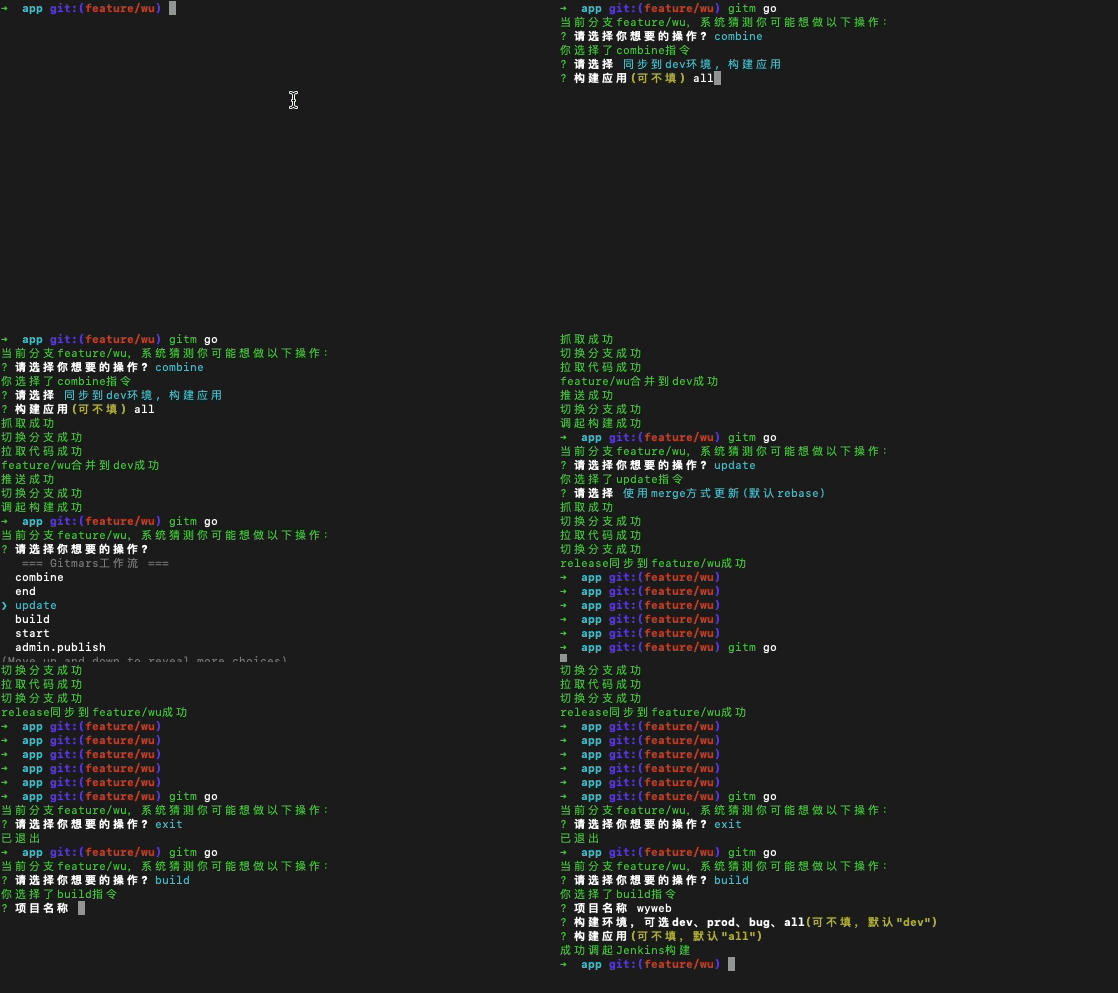
Configuration
gitm init
Initialize configuration, follow the prompts to enter settings
- Usage:
gitm init - Reference: Configuration Parameters
gitm config
Configuration query and settings
Set Single Configuration
- Usage:
gitm config <option> [value] - Arguments:
| Parameter | Description | Type | Options | Required | Default |
|---|---|---|---|---|---|
| option | Configuration name | String | - | Yes | - |
| value | Configuration value | String | - | No | - |
- Example:
- Set master branch name to main
gitm config master main- Set apollo configuration (json)
gitm config apolloConfig "{ ... }"Query Configuration
- Usage:
gitm config list [option] - Arguments:
| Parameter | Description | Type | Options | Required | Default |
|---|---|---|---|---|---|
| option | Configuration name | String | - | No | - |
- Example:
- Query all configurations
gitm config list- Query apollo configuration
gitm config list apolloConfigWorkflow
TIP
Create Thursday task branches (release), daily bug fix branches (bugfix), and project framework-related support branches
gitm start
Short command: gitm st
Start task, create branch
- Usage:
gitm start <type> <name> [-t --tag <tag>] - Arguments:
| Parameter | Description | Type | Options | Required | Default |
|---|---|---|---|---|---|
| type | Branch type | String | feature/bugfix/support | Yes | - |
| name | Branch name | String | - | Yes | - |
- Options:
| Name | Short | Description | Type | Options | Required | Default |
|---|---|---|---|---|---|---|
| --tag | -t | Create branch from tag | String | - | true | '' |
- Example:
- Create main workflow branch
# start bugfix branch
gitm start bugfix 20001
# start feature branch
gitm start feature 1001- Create bugfix branch from tag
# tag 20211010
gitm start bugfix 1001 --tag 20211010
gitm combine
Short command: gitm cb
v2.11.0 added
--descriptionparameter
v5.3.0 added data parameter, supports passing extra parameters
v7.0.0 supports batch merging
Use combine command to automatically merge bugfix and feature branches to dev or pre-release environment
- Usage:
gitm combine [type] [name] [-a --add] [-m --commit [message]] [-d --dev] [-p --prod] [-b --build [build]] [--data <data>] [--description [description]] [--no-bugfix] [--as-feature] [-f --force] - Arguments:
| Parameter | Description | Type | Options | Required | Default |
|---|---|---|---|---|---|
| type | Branch type | String | feature/bugfix/support | No | Current branch type |
| name | Branch name | String | - | No | Current branch name |
- Options:
| Name | Short | Description | Type | Options | Required | Default |
|---|---|---|---|---|---|---|
| --add | -a | Whether to execute add | Boolean | - | - | false |
| --commit | -m | Whether to execute commit, message required | String | - | Yes | '' |
| --description | Description of this commit | String | - | No | '' | |
| --dev | -d | Sync to dev, required with --prod | Boolean | - | - | false |
| --prod | -p | Sync to prod, required with --dev | Boolean | - | - | false |
| --build | -b | Application to build | String | all/... | No | all |
| --no-bugfix | Don't sync to bug branch (support only) | Boolean | - | - | false | |
| --as-feature | Merge bugfix to release | Boolean | - | - | false | |
| --force | -f | Force merge request | Boolean | - | - | false |
| --data | Extra data to pass, JSON string | String | - | No | '{}' |
- Example:
- Merge current branch to alpha
gitm combine -d
# or
gitm cb -d- Merge current branch to alpha and build
gitm combine -d -b
# or
gitm combine -d --build all
# or
gitm cb -d -b gitmars- Merge bugfix/20001 branch to alpha and prod
gitm combine bugfix 20001 -pd
# or
gitm cb bugfix 20001 -pd
# or
gitm cb 20001 -d- Merge bugfix branch to release with --as-feature
gitm combine bugfix 20001 -p --as-feature
# or
gitm cb -p --as-feature- Support branch prod merge syncs to bugfix and release, use --no-bugfix to skip bugfix
gitm combine support 20001 -pd --no-bugfix
# or
gitm cb -pd --no-bugfix- Pass extra build parameters
gitm combine -b --data '{"app_id":"xxxxxx"}'- Batch select feature branches for merging
# Enter command and select branches to merge as prompted
gitm cb feature -d
gitm end
Short command: gitm ed
v2.9.6
endcommand intelligently determines whether to merge code
v2.11.0 added--descriptionparameter
v7.0.0 supports batch branch ending
Task complete, merge and delete branch. This operation merges 20001 branch code to bug branch and deletes 20001 branch (remote 20001 branch will also be deleted)
- Usage:
gitm end [type] [name] [--description [description]] [--no-combine] [--as-feature] - Arguments:
| Parameter | Description | Type | Options | Required | Default |
|---|---|---|---|---|---|
| type | Branch type | String | feature/bugfix/support | No | Current branch type |
| name | Branch name | String | - | No | Current branch name |
- Options:
| Name | Short | Description | Type | Options | Required | Default |
|---|---|---|---|---|---|---|
| --no-combine | Don't merge to main branch (ensure branch is released) | Boolean | - | - | false | |
| --as-feature | Merge bugfix type branch to release | Boolean | - | - | false | |
| --description | Description of this commit | String | - | No | '' |
- Example:
- End bugfix/20001 branch
gitm end bugfix 20001
# or
gitm ed bugfix 20001- End current branch
gitm end
# or
gitm ed
# End without merging code
gitm end --no-combine
# Merge as feature
gitm end --as-feature- Batch select feature branches for cleanup
# Enter command and select branches to clean as prompted
gitm end feature
gitm update
Short command: gitm up
Sync latest code from bug branch to 20001 branch (--use-rebase uses rebase method, default false)
- Usage:
gitm update [type] [name] [--use-merge] [--use-rebase] [-a --all] [-f --force] - Arguments:
| Parameter | Description | Type | Options | Required | Default |
|---|---|---|---|---|---|
| type | Branch type | String | feature/bugfix/support | No | Current branch type |
| name | Branch name | String | - | No | Current branch name |
- Options:
| Name | Short | Description | Type | Options | Required | Default |
|---|---|---|---|---|---|---|
| --use-merge | Use merge to update code (deprecated) | Boolean | - | - | true | |
| --use-rebase | Use rebase to update code | Boolean | - | - | false | |
| --all | -a | Update all local development branches | Boolean | - | - | false |
| --force | -f | Force merge request | Boolean | - | - | false |
- Example:
- Update bugfix/20001 branch
gitm update bugfix 20001
# or
gitm up bugfix 20001- Use rebase to update current branch
gitm update --use-rebase
# or
gitm up --use-rebase- Update all local development branches
gitm update --all
# or
gitm up -a- Update all local feature branches
gitm update feature --all
# or
gitm up feature -a
gitm continue
Short command: gitm ct
Continue unfinished operations
- Usage:
gitm continue - Example:
- Options:
| Name | Short | Description | Type | Options | Required | Default |
|---|---|---|---|---|---|---|
| --list | -l | View list of unfinished commands | Boolean | - | No | - |
- Continue unfinished operations
gitm continue
# or
gitm ct- View list of unfinished commands
gitm continue --list
# or
gitm ct -l
Efficiency
gitm copy
Short command: gitm cp
v4.0.0 Refactored to self-select commit records
v7.1.0 Added--pushparameter to push target branch to remote after copy
Copy commit records from current branch to target branch
- Usage:
gitm copy [commitid...]orgitm copy [--lastet [lastet]] [--limit [limit]] [--no-merges] [-p -push] - Arguments:
| Parameter | Description | Type | Options | Required | Default |
|---|---|---|---|---|---|
| commitid | Commit IDs to copy, multiple IDs separated by spaces | String | - | No | - |
- Options:
| Name | Short | Description | Type | Options | Required | Default |
|---|---|---|---|---|---|---|
| --no-merge | Exclude merge records | Boolean | - | No | false | |
| --lastet | Query logs after a certain time, format: 10s/2m/2h/3d/4M/5y | String | - | No | '7d' | |
| --limit | Maximum number of logs to query | Number | - | No | 20 | |
| --push | -p | Push target branch to remote | boolean | - | No | false |
- Example:
- No commitid, filter logs to display (default 20)
gitm copy --lastet 7d --limit 100
# or
gitm cp --lastet 7d --limit 100- Pass single or multiple commitIDs
# Format: gitm copy [commitid...]
gitm copy xxxxxx xxxxxx
# or
gitm cp xxxxxx
gitm build
Short command: gitm bd
v5.3.0 Added data parameter, supports passing extra parameters
v6.2.0 Added --confirm parameter
v7.0.0 Adjusted to support parameter selection,projectparameter no longer required
This command initiates Jenkins build, project required, app name can be all
- Usage:
gitm build [project] [-e --env [env]] [-a --app [app]] [-d --data <data>] [-c --confirm] - Arguments:
| Parameter | Description | Type | Options | Required | Default |
|---|---|---|---|---|---|
| project | Project to build, if not passed, uses project name from git address | String | - | No | - |
- Options:
| Name | Short | Description | Type | Options | Required | Default |
|---|---|---|---|---|---|---|
| --env | -e | Environment to build | String | dev/prod/bug | No | - |
| --app | -a | Sub-project to build | String | - | No | - |
| --data | -d | Extra data to pass, JSON string | String | - | No | '{}' |
| --confirm | -c | Confirm start, skip confirmation if true | Boolean | - | No | false |
- Example:
- Build gitmars app application
gitm build gitmars --env dev --app app- Self-select parameters
gitm buildgitm build-mp
Short command: gitm bdm
v7.0.0 Added
v7.4.0 Added version type selection, added baseInfo input
This command initiates Jenkins miniprogram build
- Usage:
gitm build-mp [project] [-e --env [env]] [--api-env [apiEnv]] [-mp --miniprogram [miniprogram]] [-des --description [description]] [-a --app [app]] [-d --data <data>] [-c --confirm] - Arguments:
| Parameter | Description | Type | Options | Required | Default |
|---|---|---|---|---|---|
| project | Project to build, if not passed, uses project name from git address | String | - | No | - |
- Options:
| Name | Short | Description | Type | Options | Required | Default |
|---|---|---|---|---|---|---|
| --env | -e | Environment to build | String | dev/prod/bug | No | - |
| --api-env | API environment to build | String | alpha/tag/release/production | No | - | |
| --miniprogram | -mp | Generate experience version miniprogram | String | - | No | - |
| --description | -des | Version description | String | - | No | - |
| --app | -a | Sub-project to build | String | weapp/alipay/tt/dd/swan | No | - |
| --data | -d | Extra data to pass, JSON string | String | - | No | '{}' |
| --confirm | -c | Confirm start, skip confirmation if true | Boolean | - | No | false |
- Example:
- Build gitmars app application
gitm build-mp gitmars --env dev --app weapp- Self-select parameters
gitm build-mpgitm miniprogram
Short command: gitm mp
v7.0.0 Added
This command operates customized miniprograms
- Usage:
gitm miniprogram [miniprogram] [-k --keyword [keyword]] - Arguments:
| Parameter | Description | Type | Options | Required | Default |
|---|---|---|---|---|---|
| miniprogram | Miniprogram AppID, or enter auth to get authorization code | String | - | auth | String | - |
- Options:
| Name | Short | Description | Type | Options | Required | Default |
|---|---|---|---|---|---|---|
| --keyword | -k | Miniprogram name for fuzzy search | String | - | No | - |
- Example:
- Get authorization code
gitm miniprogram auth
# or
gitm mp- Select miniprogram to operate
gitm miniprogram
# or
gitm miniprogram --keyword test- Enter miniprogram AppID to operate
gitm miniprogram xxxxxxgitm branch
Short command: gitm bh
v2.14.2 Added --exclude and --include options
Provides branch search and delete functionality
- Usage:
gitm branch [-k --key] [-t --type] [--exclude [exclude]] [--include [include]] [-r --remote]orgitm branch [-d --delete [name]] [-D --forcedelete [name]]orgitm branch [-u --upstream [upstream]] - Options:
| Name | Short | Description | Type | Options | Required | Default |
|---|---|---|---|---|---|---|
| --key | -k | Fuzzy match keyword | String | - | No | - |
| --exclude | Branch names to exclude, supports regex or string | String/RegExp | - | No | - | |
| --include | Filter branches matching condition, supports regex or string | String/RegExp | - | No | - | |
| --type | -t | Branch type, default all | String | bugfix/feature/support | No | - |
| --remote | -r | Query remote branches | Boolean | - | No | false |
| --delete | -d | Delete local branch | String | - | Yes | - |
| --forcedelete | -D | Force delete local branch | String | - | Yes | - |
| --upstream | -u | Pass branch name to bind, empty to unbind | String | - | No | '' |
- Example:
- Query local feature branches
# Format: gitm branch [-k --key] [-t --type] [--exclude [exclude]] [--include [include]] [-r --remote]
gitm branch --key bug001 --exclude="saqqdy$" --include="wu$" --remote --type feature
# or
gitm bh -k bug001 --exclude="saqqdy$" --include="wu$" -r -t feature- Delete local branch
# Format: gitm branch [-d --delete] [-D --forcedelete]
gitm branch -D bugfix/bug001
# or
gitm bh -D bugfix/bug001- Delete local and remote branches
# Format: gitm branch [-d --delete] [-D --forcedelete] [-r --remote]
gitm branch -D bugfix/bug001 --remote
# or
gitm bh -D bugfix/bug001 -r- Set current branch to track remote feature/1000 branch
# Format: gitm branch [-u --upstream [upstream]]
gitm branch -u feature/1000- Unbind current branch from remote
gitm branch -ugitm revert
Short command: gitm rt
Revert a commit record on current branch. If reverting a merge record, need to pass revert method, 1 = keep current branch code; 2 = keep incoming code
- Usage:
gitm revert [commitid] [-m --mode [mode]]orgitm revert [-n --number] [-m --mode [mode]] - Arguments:
| Parameter | Description | Type | Options | Required | Default |
|---|---|---|---|---|---|
| commitid | ID to revert | String | - | No | - |
- Options:
| Name | Short | Description | Type | Options | Required | Default |
|---|---|---|---|---|---|---|
| --number | -n | Revert last N records, don't pass commitID when using | Number | - | No | false |
| --mode | -m | Which code to keep when reverting merge, 1=keep current, 2=keep incoming | Number | - | No | - |
- Example:
- Revert last commit (or revert nth last commit)
# Format: gitm revert [-n --number] [-m --mode [mode]]
gitm revert -n 3
# or
gitm rt -n 3- Revert specific commit ID
# Format: gitm revert [commitid] [-m --mode [mode]]
gitm revert xxxxxx --mode 1
# or
gitm rt xxxxxx -m 1
gitm undo
Short command: gitm ud
v2.15.0 Added command. Added
--no-merges--limit--lastet--calc--calcAllparameters, removed--branchparameter
Undo commit record on current branch, or undo multiple merge records of a branch. If undoing a merge record, need to pass undo method, 1 = keep current branch code; 2 = keep incoming code
- Usage:
gitm undo [commitid...] [-m --mode [mode]]orgitm undo [--lastet [lastet]] [--limit [limit]] [-m --mode [mode]] [--no-merges]orgitm undo [--calc] [--calcAll] - Arguments:
| Parameter | Description | Type | Options | Required | Default |
|---|---|---|---|---|---|
| commitid | IDs to undo, multiple IDs separated by spaces | String | - | No | - |
- Options:
| Name | Short | Description | Type | Options | Required | Default |
|---|---|---|---|---|---|---|
| --mode | -m | Which code to keep when undoing merge, 1=keep current, 2=keep incoming | Number | - | No | - |
| --no-merge | Exclude merge records | Boolean | - | No | false | |
| --lastet | Query logs after a certain time, format: 10s/2m/2h/3d/4M/5y | String | - | No | '7d' | |
| --limit | Maximum number of logs to query | Number | - | No | 20 | |
| --calc | Clean failed undo records of current branch | Boolean | - | No | false | |
| --calcAll | Clean failed undo records of all branches | Boolean | - | No | false |
- Example:
- No commitid, show log list to select commits to undo, if merge record, keep current branch code
# Format: gitm undo [-m --mode [mode]]
gitm undo -m 1
# or
gitm ud -m 1- No commitid, filter logs to display (default 20)
gitm undo --lastet 7d --limit 100 --mode 1
# or
gitm ud --lastet 7d --limit 100 --mode 1- Pass single or multiple commitIDs
# Format: gitm undo [commitid...] [-m --mode [mode]]
gitm undo xxxxxx xxxxxx --mode 1
# or
gitm ud xxxxxx -m 1- Clean failed undo records of current branch
# Format: gitm undo [--calc] [--calcAll]
gitm undo --calc
# or
gitm ud --calc
gitm redo
Short command: gitm rd
v2.15.0 Added command
Redo commit record on current branch, or redo multiple merge records of a branch. If redoing a merge record, need to pass redo method, 1 = keep current branch code; 2 = keep incoming code
- Usage:
gitm redo [commitid...] [-m --mode [mode]]orgitm redo [-m --mode [mode]] - Arguments:
| Parameter | Description | Type | Options | Required | Default |
|---|---|---|---|---|---|
| commitid | IDs to redo, multiple IDs separated by spaces | String | - | No | - |
- Options:
| Name | Short | Description | Type | Options | Required | Default |
|---|---|---|---|---|---|---|
| --mode | -m | Which code to keep when redoing merge, 1=keep current, 2=keep incoming | Number | - | No | - |
- Example:
- Pass branch name
# Format: gitm redo [commitid...] [-m --mode [mode]]
gitm redo xxxxxx xxxxxx --mode 1
# or
gitm rd xxxxxx xxxxxx -m 1- Pass single or multiple commitIDs
# Format: gitm redo [-m --mode [mode]]
gitm redo --mode 1
# or
gitm rd -m 1
gitm save
Short command: gitm sv
Stage current branch code
- Usage:
gitm save [message] [-f --force] - Arguments:
| Parameter | Description | Type | Options | Required | Default |
|---|---|---|---|---|---|
| message | Stash marker info, defaults to current branch name | String | - | No | Current branch name |
- Options:
| Name | Short | Description | Type | Options | Required | Default |
|---|---|---|---|---|---|---|
| --force | -f | Add untracked files before staging | Boolean | - | No | false |
- Example:
- Simple usage
gitm save
# or
gitm sv- Stage untracked files
gitm save --force
# or
gitm save -f- Set custom stash message for easy retrieval
gitm save feature/1000
# or
gitm save "test login"
gitm get
Short command: gitm gt
Restore staged code
- Usage:
gitm get [message] [index] [-k --keep] - Arguments:
| Parameter | Description | Type | Options | Required | Default |
|---|---|---|---|---|---|
| message | Stash marker info, defaults to current branch name | String | - | No | Current branch name |
| index | Index to restore, restores most recent record by default | Number | - | No | 0 |
- Options:
| Name | Short | Description | Type | Options | Required | Default |
|---|---|---|---|---|---|---|
| --keep | -k | Keep staged records | Boolean | - | No | false |
- Example:
- Simple usage
gitm get
# or
gitm gt- Restore feature/1000 branch stash to current branch, take 2nd record (index defaults to 1st: 0)
gitm get feature/1000 1- Keep stash data when restoring
gitm get --keep
# or
gitm get -k- Restore stash with message "test login"
gitm get "test login"gitm cleanbranch
Short command: gitm clb
v2.13.0 Added
v2.13.1 Added --list parameter
v2.13.4 Added --confirm parameter
v2.13.6 Added branches, added --target
v2.13.9 Changed --except to --exclude; added --include; added --key
v4.0.0 Added --strictly parameter
Clean merged feature branches
- Usage:
gitm cleanbranch [branches...] [-l --list [list]] [-k --key [keyword]] [--exclude [exclude]] [--include [include]] [-t --type [type]] [--target [target]] [-r --remote] [-c --confirm] [-s --strictly] - Arguments:
| Parameter | Description | Type | Options | Required | Default |
|---|---|---|---|---|---|
| branches | Specify branches to clean | String | - | No | - |
- Options:
| Name | Short | Description | Type | Options | Required | Default |
|---|---|---|---|---|---|---|
| --list | -l | Show list of matching branches | Boolean | - | No | false |
| --key | -k | Keyword to search branches | String | - | No | - |
| --exclude | Branch names to exclude, supports regex or string | String/RegExp | - | No | - | |
| --include | Filter branches matching condition, supports regex or string | String/RegExp | - | No | - | |
| --type | -t | Branch type, supports: feature/bugfix/support | String | - | No | - |
| --target | Target branch to check for merge, defaults to develop and release | String | - | No | - | |
| --remote | -r | Clean remote branches, defaults to local | Boolean | - | No | false |
| --strictly | -s | Enable strict mode | Boolean | - | No | false |
| --confirm | -c | Confirm start, skip confirmation if true | Boolean | - | No | false |
- Example:
- View matching branches before cleaning
gitm cleanbranch --remote --exclude "saqqdy$" --include "[a-z]+$" --key "wu" --list
# or
gitm cleanbranch -r --exclude "saqqdy$" --include "[a-z]+$" -k "wu" -l- Clean all remote feature branches
gitm cleanbranch --remote
# or
gitm cleanbranch -r- Clean all remote feature branches, excluding exclude-matched branches
gitm cleanbranch --remote --exclude "saqqdy$"
# or
gitm cleanbranch -r --exclude "saqqdy$"- Clean all local feature branches
gitm cleanbranch --type feature
# or
gitm cleanbranch -t feature- Clean specified branches:
feature/10000andfeature/10001
gitm cleanbranch feature/10000 feature/10001- Change target branch to check to only need merged to
release
gitm cleanbranch --target release- Use strict mode for checking
gitm cleanbranch --target release --strictlygitm log
v1.4.0 Added
v2.15.0 Added--no-mergesparameter
v2.15.3 Added--jsonparameter for JSON output, defaults to table
Query logs
- Usage:
gitm log [branch] [--lastet [lastet]] [--limit [limit]] [--no-merges] [--json] - Arguments:
| Parameter | Description | Type | Options | Required | Default |
|---|---|---|---|---|---|
| branch | Branch name | String | - | No | - |
| Name | Short | Description | Type | Options | Required | Default |
|---|---|---|---|---|---|---|
| --lastet | Query logs after a certain time, format: 10s/2m/2h/3d/4M/5y | String | - | No | '7d' | |
| --limit | Maximum number of logs to query | Number | - | No | 20 | |
| --no-merge | Exclude merge records | Boolean | - | No | false | |
| --json | Output logs in JSON format, defaults to table | Boolean | - | No | false |
- Example:
- Query logs within last 7 days, max 50
gitm log --latest 7d --limit 50- Exclude merge records
gitm log --no-merges --limit 50- View dev branch log
gitm log dev- View logs in JSON format
gitm log --jsongitm hook
1.4.0 Added
Publish operation
- Usage:
gitm hook [command] [args...] [--no-verify] [--lastet [lastet]] [--limit [limit]] [-t --type <type>] [--branch [branch]] - Arguments:
| Parameter | Description | Type | Options | Required | Default |
|---|---|---|---|---|---|
| command | Command name | String | - | Yes | - |
- Options:
| Name | Short | Description | Type | Options | Required | Default |
|---|---|---|---|---|---|---|
| --no-verify | Skip permission verification | Boolean | - | No | false | |
| --lastet | Query logs after a certain time, format: 10s/2m/2h/3d/4M/5y | Boolean | - | No | - | |
| --limit | Maximum number of logs to query | Number | - | No | 20 | |
| --type | -t | Check type | Number | - | Yes | '' |
| --branch | Branch to query | String | - | No | '' |
gitm run
1.4.0 Added
TIP
Internal method, only for internal program use
Run command is an internal command executed in gitmars hook to run hook methods
- Usage:
gitm run <command> [args...] - Arguments:
| Parameter | Description | Type | Options | Required | Default |
|---|---|---|---|---|---|
| command | Hook name | String | Yes | - | |
| args | Argument list | String | No | - |
gitm upgrade
Short command: gitm ug
Upgrade gitmars version. Can specify version, optional, defaults to latest
- Usage:
gitm upgrade [version] [-m --mirror] [-c --client [client]] [-r --registry <registry>] - Arguments:
| Parameter | Description | Type | Options | Required | Default |
|---|---|---|---|---|---|
| version | Version to upgrade to | String | alpha, beta, release, lite, latest, next, x.x.x | No | latest |
- Options:
| Name | Short | Description | Type | Options | Required | Default |
|---|---|---|---|---|---|---|
| --mirror | -m | Use Taobao mirror for upgrade | Boolean | - | No | false |
| --registry | -r | Use mirror address | String | - | Yes | false |
| --mirror | -m | Use Taobao mirror for upgrade | Boolean | - | No | false |
- Example:
- Simple usage
gitm upgrade --mirror
# or
gitm ug -m
gitm clean
Clean gitmars cache and local configuration. Use --force to also clean local config files (use with caution)
Format: gitm clean [-f --force]- Options:
| Name | Short | Description | Type | Options | Required | Default |
|---|---|---|---|---|---|---|
| --force | -f | Clean gitmars execution cache | Boolean | - | No | false |
- Example:
gitm cleangitm approve
Short command: gitm ap
v2.16.0 Added
v2.16.4 Removed--postmsg, added '--quiet'
Handle remote merge requests
- Usage:
gitm approve [--state [state]] [--quiet] - Arguments: None
- Options:
| Name | Short | Description | Type | Options | Required | Default |
|---|---|---|---|---|---|---|
| --state | Filter merge request status | String | opened closed merged all | No | opened | |
| --quiet | Don't push message | Boolean | No | false |
- Example:
# Enter command and follow prompts
gitm approve --quiet
gitm review
Short command: gitm rv
v2.16.0 Added
v2.16.4 Removed--postmsg, added '--quiet'
Remote code review
- Usage:
gitm review [--state [state]] [--quiet] - Arguments: None
- Options:
| Name | Short | Description | Type | Options | Required | Default |
|---|---|---|---|---|---|---|
| --state | Filter merge request status | String | opened closed merged all | No | opened | |
| --quiet | Don't push message | Boolean | No | false |
- Example:
# Enter command and follow prompts
gitm review --state merged
gitm status
View current branch status
Usage:
gitm statusArguments: None
Options: None
Example:
gitm statusgitm link
Create local package symlink. When name is passed, symlink dependency package to local; when name is not passed, create public symlink for current package
- Usage:
gitm link [name] - Arguments:
| Parameter | Description | Type | Options | Required | Default |
|---|---|---|---|---|---|
| name | Package name | String | - | No | - |
- Example 1: Link local tool package
gitm link tool- Example 2: Create public symlink for current package
gitm linkgitm unlink
When name is passed, remove dependency package symlink; when name is not passed, delete public symlink for current package
- Usage:
gitm unlink [name] - Arguments:
| Parameter | Description | Type | Options | Required | Default |
|---|---|---|---|---|---|
| name | Package name | String | - | Yes | - |
- Example 1: Remove dependency package symlink
gitm unlink tool- Example 2: Delete public symlink for current package
gitm unlinkgitm postmsg
Push message
- Usage:
gitm postmsg <message> [-u --url [url]] - Arguments:
| Parameter | Description | Type | Options | Required | Default |
|---|---|---|---|---|---|
| message | Message content | String | - | Yes | - |
- Options:
| Name | Short | Description | Type | Options | Required | Default |
|---|---|---|---|---|---|---|
| --url | -u | Custom message push URL | String | - | No | - |
- Example:
- Simple usage
gitm postmsg "test message"- Custom push URL
gitm postmsg "test message" --url "https://github.com/"gitm alias
Short command: None
v2.18.0 Added
Install and remove shortcuts
- Usage:
gitm alias initorgitm alias remove - Arguments: None
- Options: None
- Example:
# Install
gitm alias init
# Remove
gitm alias remove- Usage:
gitmalias usage
# Create branch
gitm start feature 100001
# or
git mars start feature 100001
# or
git flow start feature 100001- Git shortcuts
| Name | Command | Usage | Description |
|---|---|---|---|
unstage | reset HEAD -- | git unstage file1.js | Remove from staging area |
last | log -1 HEAD | git last | Show last log |
st | status | git st | Git status |
cm | commit | git cm -m "xxxx" | Commit version |
br | branch | git br | Branch management |
bh | branch | git bh | Branch management |
ck | checkout | git ck dev | Switch to branch |
ckb | checkout -b | git ckb dev master | Create branch |
cp | cherry-pick | git cp xxxxxx | Copy commit record |
ps | push | git ps | Push code to remote |
pl | pull | git pl | Pull remote code |
plm | pull --merge | git plm | Pull code via merge |
plr | pull --rebase | git plr | Pull code via rebase |
fh | fetch | git fh | Fetch remote version |
sh | stash | git sh | Save to stash |
shp | stash pop | git shp | Pop from stash |
sha | stash apply | git sha | Apply from stash |
mg | merge | git mg feature/test | Merge branch |
mgn | merge --no-ff | git mgn feature/test | Merge via --no-ff |
rs | reset | git rs xxxxxx | Reset |
rsh | reset --hard | git rsh xxxxxx | Hard reset |
rss | reset --soft | git rss xxxxxx | Soft reset |
rb | rebase | git rb | Rebase |
Administrator
gitm admin create
Create release, bugfix, support, and develop branches
- Usage:
gitm admin create <type> - Arguments:
| Parameter | Description | Type | Options | Required | Default |
|---|---|---|---|---|---|
| type | Branch type | String | bugfix/release/develop | Yes | - |
- Example:
Create release branch
gitm admin create releasegitm admin publish
v2.11.0 Added
--descriptionparameter
v5.3.0 publish added data parameter, supports passing extra parameters
Publish operation
- Usage:
gitm admin publish <type> [--description [description]] [-c --combine] [--use-rebase] [-p --prod] [-b --build [build]] [-d --data <data>] [-p --postmsg] [-f --force] - Arguments:
| Parameter | Description | Type | Options | Required | Default |
|---|---|---|---|---|---|
| type | Branch type | String | bugfix/release/support | Yes | - |
- Options:
| Name | Short | Description | Type | Options | Required | Default |
|---|---|---|---|---|---|---|
| --combine | -c | Sync release to bugfix after merging release (only when merging release) | Boolean | - | No | false |
| --prod | -p | When publishing bugfix, whether to merge bugfix to master | Boolean | - | No | false |
| --build | -b | Whether to use Taobao mirror for upgrade | Boolean | - | No | false |
| --use-rebase | Use rebase for merging | Boolean | - | No | false | |
| --postmsg | -p | Whether to send group message | Boolean | - | No | false |
| --description | Description of this commit | String | - | No | '' | |
| --force | -f | Force merge request | Boolean | - | - | false |
| --data | -d | Extra data to pass, JSON string | String | - | No | '{}' |
- Example:
- Merge release code to pre-release environment
gitm admin publish release- Publish and execute build
# Build all
gitm admin publish release --build
# or
gitm admin publish release -b
# Build app only
gitm admin publish release --build app
# or
gitm admin publish release -b app- Publish and execute build, pass extra build parameters
# Build all
gitm admin publish release --build --data '{"app_id":"xxxxxx"}'
# or
gitm admin publish release -b -d '{"app_id":"xxxxxx"}'
gitm admin update
v2.11.0 Added
--descriptionparameter
Update release, bugfix, support branch code, defaults to merge method
- Usage:
gitm admin update <type> [--description [description]] [--use-rebase] [-m --mode [mode]] [-p --postmsg] [-f --force] - Arguments:
| Parameter | Description | Type | Options | Required | Default |
|---|---|---|---|---|---|
| type | Branch type | String | bugfix/release/support | Yes | - |
- Options:
| Name | Short | Description | Type | Options | Required | Default |
|---|---|---|---|---|---|---|
| --mode | -m | On conflict, which code to keep; 1=keep current 2=keep incoming; default 0=manual. Cannot use with --use-rebase | Number | 0/1/2 | No | 0 |
| --use-rebase | Use rebase for sync | Boolean | - | No | false | |
| --postmsg | -p | Whether to send group message | Boolean | - | No | false |
| --description | Description of this commit | String | - | No | '' | |
| --force | -f | Force merge request | Boolean | - | - | false |
- Example:
- Update bug branch code
gitm admin update bugfix -m 2
# or
gitm admin up bugfix -m 2
gitm admin clean
Jenkins build cleanup for git branches, can pass release, bugfix, develop branch code
- Usage:
gitm admin clean <type> - Arguments:
| Parameter | Description | Type | Options | Required | Default |
|---|---|---|---|---|---|
| type | Branch type | String | bugfix/release/support/master | Yes | - |
- Example:
Clean branches
gitm admin clean bugfixOther
gitm permission
Check for unauthorized operations
- Usage:
gitm permission - Example:
gitm version
View gitmars version number
- Usage:
gitm --version - Example:
gitm --version
# or
gitm -v